Roblox Account Manager - Manage Multiple Accounts Effortlessly

The ultimate free desktop application to organize, secure, and switch between your Roblox accounts with ease

What is Roblox Account Manager?

Roblox Account Manager is a powerful, free desktop application designed for Windows that allows you to manage multiple Roblox accounts from a single interface. Whether you need to switch between your main account and alternate accounts for storage, grinding, or game testing, this tool makes the process seamless and secure. With built-in account encryption, multi-instance support, and a comprehensive set of utilities, managing your Roblox gaming experience has never been easier.

🎮 Powerful Features for Roblox Players

Everything you need to manage multiple Roblox accounts efficiently

🔐

Military-Grade Encryption

All your account data is locally encrypted using your computer as the key. Your sensitive information stays secure and private, protected from unauthorized access.

🖥️

Multi-Instance Support

Run multiple Roblox clients simultaneously with our built-in multi-instance feature. Perfect for managing multiple accounts at the same time or playing with yourself.

⚡

Quick Account Switching

Switch between your Roblox accounts with a single click. No more logging out and entering credentials repeatedly - save time and boost productivity.

🗂️

Account Organization

Sort and group your accounts by purpose with drag-and-drop functionality. Create custom groups for storage accounts, main accounts, trading accounts, and more.

🌐

Server Browser

View detailed server information including player counts, ping rates, and geographic locations. Find the best servers for optimal gaming performance.

🎨

Customizable Themes

Personalize the interface with custom themes and colors. Make the account manager match your style and preferences for a better user experience.

🔧

Account Utilities

Access powerful tools to manage your account settings, including password changes, email updates, privacy settings, and follow configurations.

🚀

Auto-Launch Features

Automatically rejoin games after disconnections or AFK kicks. Keep your accounts active with intelligent auto-relaunch functionality.

💾

Automatic Cookie Refresh

Never worry about session expiration. The manager automatically refreshes your authentication cookies to keep accounts logged in and ready to play.

How Roblox Account Manager Works

Managing multiple Roblox accounts has never been simpler. Our application provides an intuitive interface that puts all your accounts at your fingertips. Here is how you can get started and make the most of our powerful features.

  • Download and extract the application to your preferred location
  • Launch the RBX Alt Manager executable file
  • Add your Roblox accounts using username and password or security cookies
  • Organize accounts into custom groups for easy management
  • Select any account and join games with a single click
  • Enable multi-Roblox to run multiple instances simultaneously
  • Use server browser to find optimal gaming servers
  • Customize themes and settings to match your preferences

The application stores all your data locally with encryption enabled by default. This means your account information never leaves your computer, ensuring maximum security and privacy. You can also enable password-based encryption for additional protection if you plan to back up your account data to cloud storage.

Get Started Now
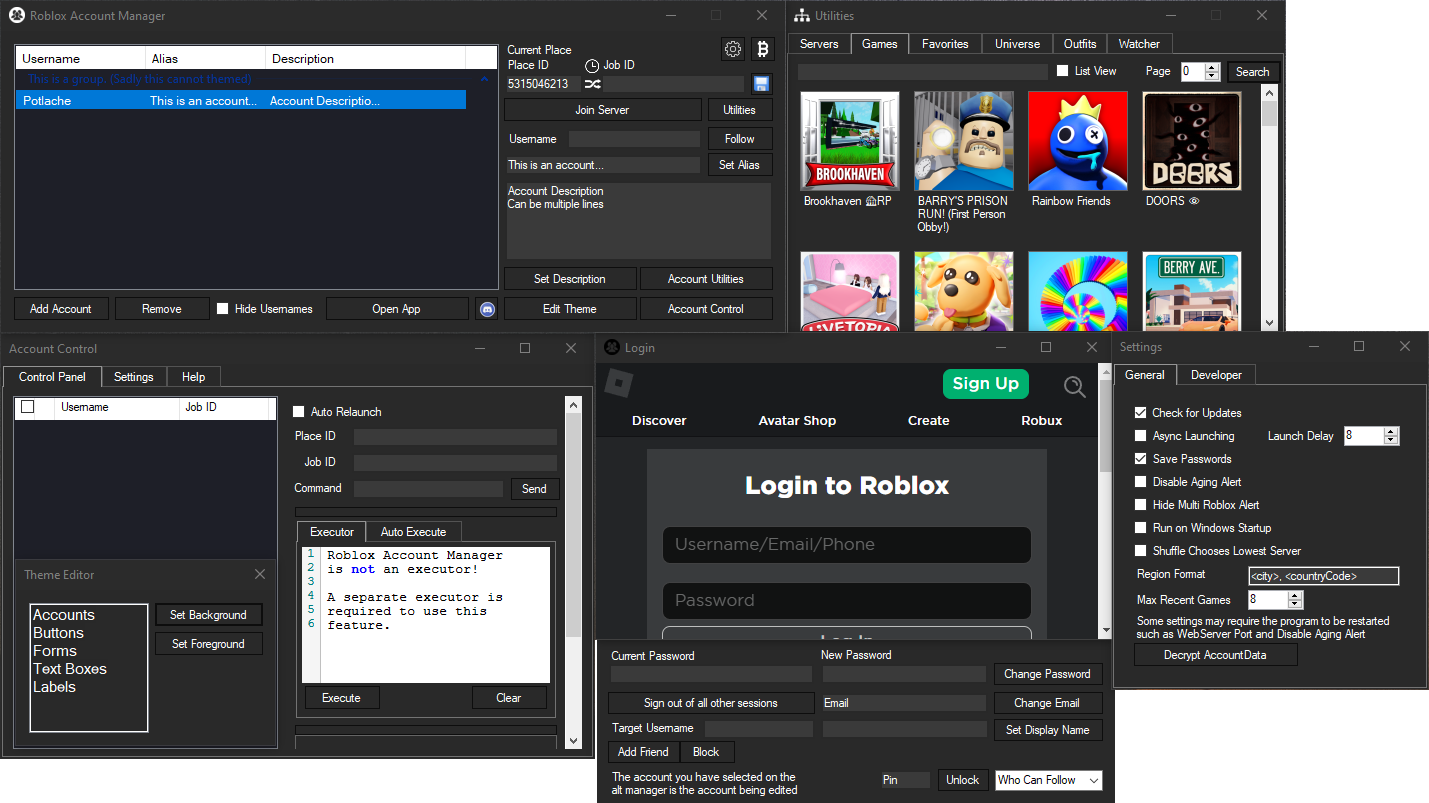
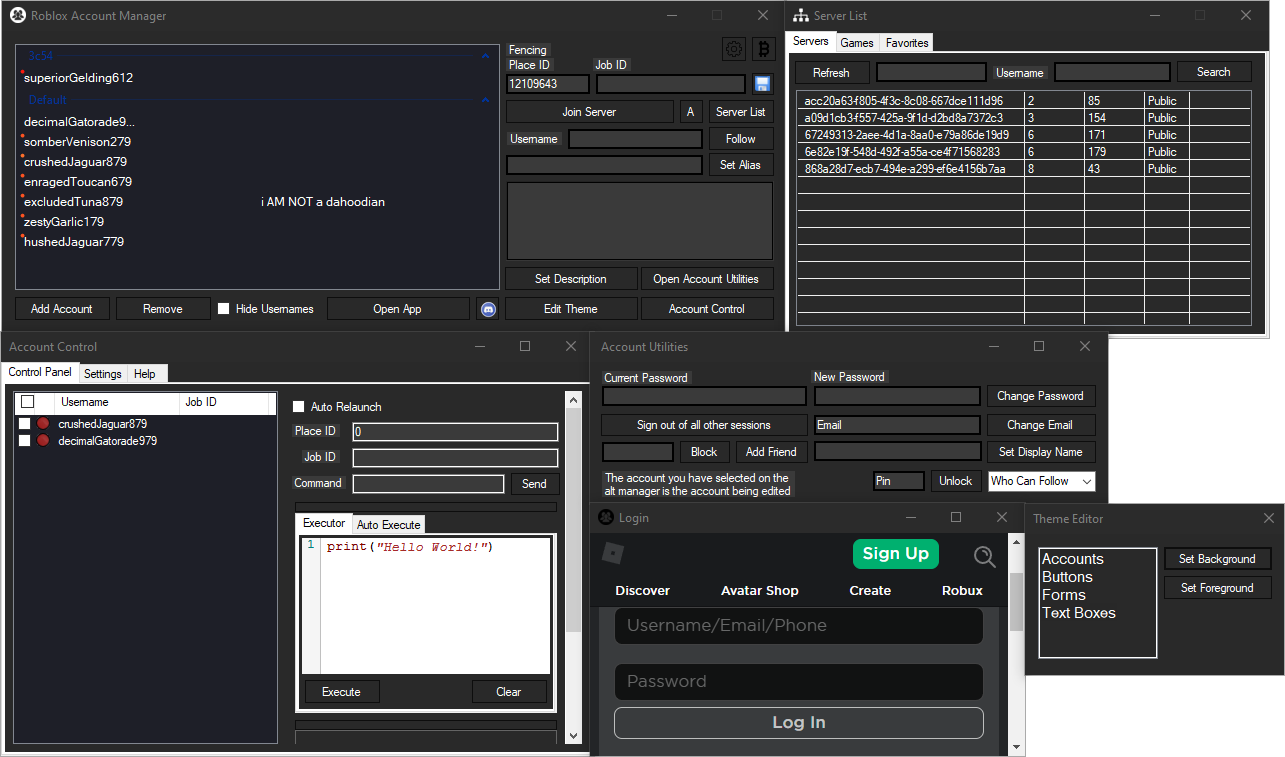
Roblox Account Manager Interface Screenshot

Why Choose Roblox Account Manager?

The most trusted solution for managing multiple Roblox accounts

Roblox Account Manager Features

Trusted by Thousands of Players

Roblox Account Manager is an open-source project with complete transparency. The entire source code is publicly available, which means you can verify exactly what the application does. This level of openness has earned the trust of thousands of Roblox players worldwide.

Regular Updates and Support

The development team actively maintains and updates the application with new features, bug fixes, and improvements. Join our community to get support, report issues, and suggest new features that enhance your experience.

Completely Free and Safe

Unlike other account management tools that charge subscription fees, Roblox Account Manager is completely free to download and use. No hidden costs, no premium tiers - just a powerful tool available to everyone. The application is safe and does not violate Roblox Terms of Service as it does not modify game files or inject code.

Advanced Developer Features

For advanced users, the application includes a local web API that allows you to integrate account management features into your own scripts and tools. Developer mode unlocks additional capabilities for power users who need more control.

50,000+

Total Downloads

4.8/5

User Rating

100%

Free & Open Source

30+

Built-in Features

Perfect for Every Type of Roblox Player

🎯

Competitive Players

Manage multiple accounts for different games and skill levels. Quickly switch between accounts to play with different friend groups or maintain separate rankings.

💰

Traders and Collectors

Organize storage accounts that hold valuable items, limited editions, and in-game currency. Keep your trading accounts separate from your playing accounts for better organization.

🎮

Game Developers

Test your games with multiple accounts to simulate different player scenarios. Check permissions, test trading systems, and ensure multiplayer features work correctly.

👥

Content Creators

Record gameplay from multiple perspectives simultaneously. Create engaging content that showcases different aspects of games or demonstrates trading mechanics.

Key Benefits of Using Roblox Account Manager

Save Time and Increase Efficiency

Stop wasting time logging out and logging back in every time you want to switch accounts. With Roblox Account Manager, you can launch any account instantly. This is especially valuable for players who frequently switch between accounts for different purposes like storage management, grinding, or playing with different friend groups.

Enhanced Security Features

Security is our top priority. Your account data is encrypted using your computer's unique hardware identifier, making it impossible for others to decrypt your saved accounts even if they gain access to the data file. You can also enable password-based encryption for an additional layer of security when backing up to cloud storage services.

Never Lose Your Progress

The application tracks when you last used each account with color-coded indicators. Yellow to red dots show accounts that have not been used for over 20 days, helping you maintain all your accounts active and preventing cookie expiration that could log you out.

Join Small Servers Easily

Finding small servers in popular games can be challenging. Our server list feature displays all available servers with player counts, allowing you to quickly find and join servers that match your preferences. This is perfect for players who want quieter gaming sessions or need to complete specific challenges.

VIP Server Support

Access your private VIP servers without hassle. Simply paste your VIP server link into the Job ID field, and the application handles the rest. This makes it easy to join private servers across multiple accounts without manual configuration.

Outfit and Universe Viewers

Browse and preview player outfits, even wear other player's outfits for inspiration. View game universe information to discover related games and understand game structures better. These utility features provide valuable insights for both players and developers.

System Requirements

Minimum Requirements

  • Operating System: Windows 7 or later
  • .NET Framework 4.7.2 or later
  • Visual C++ Redistributable (x86)
  • Active internet connection
  • 50 MB free disk space
Installation Note: If the application does not start, make sure you have the latest .NET Framework and Visual C++ Redistributable installed. Download links are provided on our download page.

Frequently Asked Questions

Everything you need to know about Roblox Account Manager

Is Roblox Account Manager safe to use? +

Yes, Roblox Account Manager is completely safe. The application is open source, meaning the entire source code is publicly available for review. It does not modify Roblox game files or inject code, and it has been trusted by thousands of players. Some antivirus programs may flag it due to the auto-update feature, but this is a false positive.

Can I get banned for using this? +

No, you cannot get banned for using Roblox Account Manager. The application does not violate Roblox Terms of Service as it does not modify game files or use exploits. However, some individual games may have rules against using alternate accounts, so check game-specific policies.

How do I enable multi-Roblox instances? +

Open the settings menu by clicking the gear icon in the top right corner. In the General tab, you will see a checkbox for Multi Roblox. Make sure Roblox is completely closed, then check the checkbox to enable this feature. This is disabled by default as a Byfron developer stated it might be considered malicious behavior.

Why does my antivirus detect this as a virus? +

Open source programs like Roblox Account Manager are sometimes flagged by antivirus software because they use similar libraries to actual malware. For example, the Account Control feature uses websockets, which is also how some malware communicates. These are false positives. You can add an exclusion for the application folder in your antivirus settings.

How do I back up my accounts? +

To back up your accounts securely, enable password-based encryption in the settings. This allows you to store your AccountData.json file safely in cloud storage like Google Drive. The password encryption ensures your data can be decrypted on different computers. Never share your AccountData.json file without password protection.

Does this work on Mac or mobile devices? +

No, Roblox Account Manager currently only supports Windows operating systems. Mac and mobile compatibility are not available at this time, though this may change in future updates. The application requires Windows 7 or later to function properly.

Ready to Simplify Your Roblox Experience?

Download Roblox Account Manager today and start managing your accounts like a pro

📥 Download Free Now